
A child's portfolio,
printed into a keepsake.
Bringing high-quality print to a digital portfolio platform — across the parent app and the operations console — around one stubborn truth: a digital book and a printed book are not the same object.
Role · Product designer
Scope · End-to-end, 2 surfaces
Year · 2026

Overview
Adding print to a portfolio families already love.
The platform already gives schools, teachers and parents a shared digital portfolio — teachers document learning, parents follow along. The new product prints it: a high-quality keepsake book, co-created by school and parent, or made by a parent alone. I owned the print experience across the parent app and the operations console.
Parent app
Build & submit
Where a parent turns a portfolio into a printed book — adds their own pages, arranges them around the school's, picks the printed 30, and submits. Prepaid during the campaign, so there's no checkout at the end. Warm, photo-first, low patience for system jargon.
Operations console
Run & fulfil
The company runs the whole print back office here — opens each school's campaign, decides when parents can start, tracks every order, and exports print-ready files. Schools and teachers never touch it.
The Problem
Print turned simple ideas suddenly hard.
On screen a portfolio is endless and weightless. As a printed, paid keepsake it gains covers, a fixed page count, and two owners. Three tensions shaped the whole design.
01
Two ways to make one thing
A book can be co-created with the school or made by a parent alone. They look alike but follow different rules about who owns and edits what — and a parent must always know which they're in.
02
The book is smaller than the portfolio
Print is a fixed 30 pages — clear from the start. But a digital portfolio can run well past that, so when it does, someone has to choose which 30 become the keepsake.
03
The school's work can't be reshuffled
Teachers' pages and the covers are fixed — they can't be edited or reordered, even as a parent arranges their own pages freely around them.

None of this needed a clever screen. It needed clean boundaries — co-work vs personal, the school's fixed block vs the parent's free pages, the digital portfolio's scope vs the printed 30 — drawn so plainly that every screen could stay simple.
What I learned
Four findings that
reshaped the model.
Mental model
Parents think “my child's book,” not “session”
Nobody opened the app looking for a campaign. They looked for Maya. The home screen had to be organised around the child.
Timing
Keep the digital portfolio generous
The print is a fixed 30 pages, and that's clear up front. So there's no reason to cap the book as it's built — let it grow, and let the parent choose the printed 30 only when they order.
Ownership
The school's pages are precious
Teacher-made pages carry real emotional weight. In the printed book parents want them kept exactly as-is — visible, but locked, never reshuffled.
Operations
Operators schedule, they don't toggle
Running many schools at once, operators think in dates: “opens 1 Aug.” The control should express time, not an internal on/off state.
Framing
How might we…
…make two different book types feel obviously distinct without two confusing menus?
…let parents build as much as they like in digital, then choose their printed 30 with confidence?
…show a co-work book as one keepsake made by two contributors — the school and the parent?
…give operators confident control over when a campaign goes live?
Who it's for
Three people, three
very different jobs.
Parent of Maya, 4
Li Wei
Wants a beautiful keepsake without a learning curve. Will abandon at the first moment of confusion or a surprise
charge.
Teacher
Ms. Farah
Builds the child's digital portfolio in the teacher app — photos, work samples, assessment. Needs it preserved exactly when it goes to print, never altered by parents.
Runs the print product
Platform ops
Opens print for each school, batches print-ready exports, and chases the orders that stall. Lives in tables and dates, across many schools at once.
Design principles
Five rules I designed against.
1. One child, one shelf
Organise around the child's books, not the system's campaigns or sessions.
2. Decide at the right moment
The print is a fixed 30 — known up front. The choice of which 30 happens at print, never while building.
3. The school's set is a fixed block
School pages stay exactly as the teacher arranged them — visible, never edited or reordered. Parents place their own pages around that block.
4. One book, clearly composed
A co-work book shows its two contributors plainly — the school's locked pages and the parent's own, adding up to one printed keepsake.
5. Operators set time, not state
Campaign control reads as “when,” expressed in plain dates.
Information architecture
The two-book model, made explicit.
Untangling the model was the real design work. Everything downstream — navigation, the co-work book, the print step — falls out of drawing this clearly.
A child's shelf - Every book belongs to one child — here, Maya.
Co-work portfolio
School pages + parent pages → one printed book
The school's pages — locked, can't be edited
Parent pages — arranged around the school's
Assessment pages — stay digital, not printed
Personal photobook
Parent only · Independent from school · opens on a set date
Auto-generate from school album
Or start from a blank book
Key decisions · Parent app
Designing the build-to-print journey.
The unification
One book, two contributors
A co-work book is the school's portfolio pages plus the parent's own — combined into a single printed keepsake.
I made the screen state that plainly: the school's locked pages, the editable pages, one 30-page book, with a quiet line noting that assessment pages stay in the digital portfolio and aren't printed.
The hardest part of the model became the clearest screen.


Personal book
A real choice, not a guess
Starting a book asks one question — auto-generate from the school album, or start blank.
I used radio buttons and one Continue, so the decision is visible and reversible.
Ownership
Arrange around a locked stack
The school's pages — and the front and back covers — are locked and can't be moved or reordered.
Everything else belongs to the parent: they drag their own pages individually, placing each one before or after the school stack.
Total freedom over their pages, and the school's sequence is always preserved.


Print selection
When the portfolio runs long
Print is always 30 pages, and parents know that going in. So when a portfolio has more, the app doesn't quietly pick for them — it pauses and hands over the choice.
Plain numbers, a clear decision, and a promise that nothing leaves the digital book.
Reconciliation
Choose 30 — the parent decides
The picker reconciles a long digital book down to a 30-page print.
School pages come pre-selected, out of respect for the collaboration — but the parent bought the book, so every page can be unchecked, the school's included.
A running counter and a “12 stay digital” chip keep the trade-off honest.

Key decisions · Operations console
Giving operators control
over time, not state.
The company runs the entire back office here — every school's campaign, every order — so schools and teachers never have to. The headline fix: expressing “when books open” as a date, not a hidden switch.

Campaign setup — a nested radio hierarchy: start now, or pre-order and auto-enable on a date.

School detail — the full per-school funnel, from enrolment through link clicks to confirmed orders, with the campaign and its children inline.
_edited.png)
Orders — grouped by campaign and school, with per-row export and a bulk “export selected” for the printer; statuses move awaiting → exported → delivered.
The parent app
Ten screens, one journey.

Home — In progress
A status tab bar filters the shelf: in progress, ready to start, submitted, delivered.
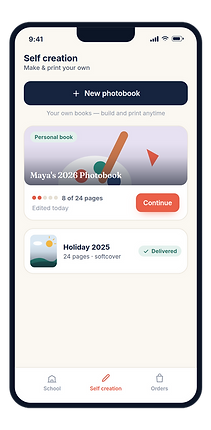
Self creation
Parents build and print their own books, in their own time
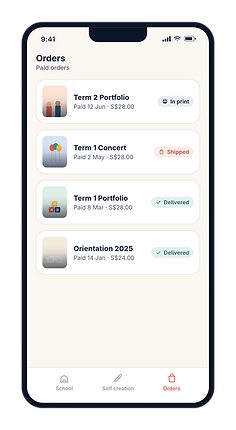
Orders
Every paid order, tracked from print to delivery.

Co-work book
One keepsake from two contributors — the school's locked pages plus the parent's own.

Starting a book
Auto-generate or start blank — radio selections and a single Continue.

Photo source
Tabs keep school, phone and camera sources one tap apart.

Spread editor
A single-page spread: tap text to edit, tap a photo to replace, with the page thumbnails and tools below.

Arrange pages
Parent pages drag individually; the school stack and covers stay locked in place.

Choose 30 of N
School pages are pre-selected but the parent can uncheck any — the rest stay digital.

Print selection
Print is a fixed 30 pages; when a portfolio runs longer, the app hands the choice to the parent.
Status & next
Version one. Now we listen.
This is the first release, so there's no before-and-after to report. The real test starts when schools run a term and parents begin building. I kept the model legible on purpose, so the next iteration can turn on real signals rather than guesses — three I'll be watching:
Clarity
Control
Do parents tell a co-work book from their own, and grasp what prints versus what stays digital — without help?
Does dragging pages around a locked school stack stay obvious once a book runs long?
Confidence
When a portfolio passes 30 pages, does choosing the printed set feel like a choice, not a chore?
Reflection
The real work was the rules.
Almost none of the difficulty here lived in a layout. It lived in a handful of rules about who controls what — who can move a page, who can edit one, and whose pages get cut when a 40-page book has to print as 30. Each rule is a small trust contract between a school and a family, and no screen reads right until they're settled. I redrew the model far more often than I drew any single screen.
The decision I'd defend hardest is the one that looks reckless: letting a parent uncheck the school's own pages at print. Locking them in would have been safer and easier to explain. But the parent buys the book, so the book is theirs to shape — a keepsake you didn't get to choose isn't much of a keepsake. The craft was honouring that while keeping the school's stack and the covers fixed everywhere else, so the school's work stays protected without overriding the family.
I pushed the parent's build-to-print path much further than the operations console. Before I trusted that side, I'd shadow an operator through a real term — hundreds of books exported at once, the few that stall chased down — and rebuild the dashboard around what actually goes wrong. I'd also retest the locked-stack arrangement with a parent juggling a dozen of their own pages, to be sure “drag around a fixed block” still feels obvious well past the tidy example.
Fin.